

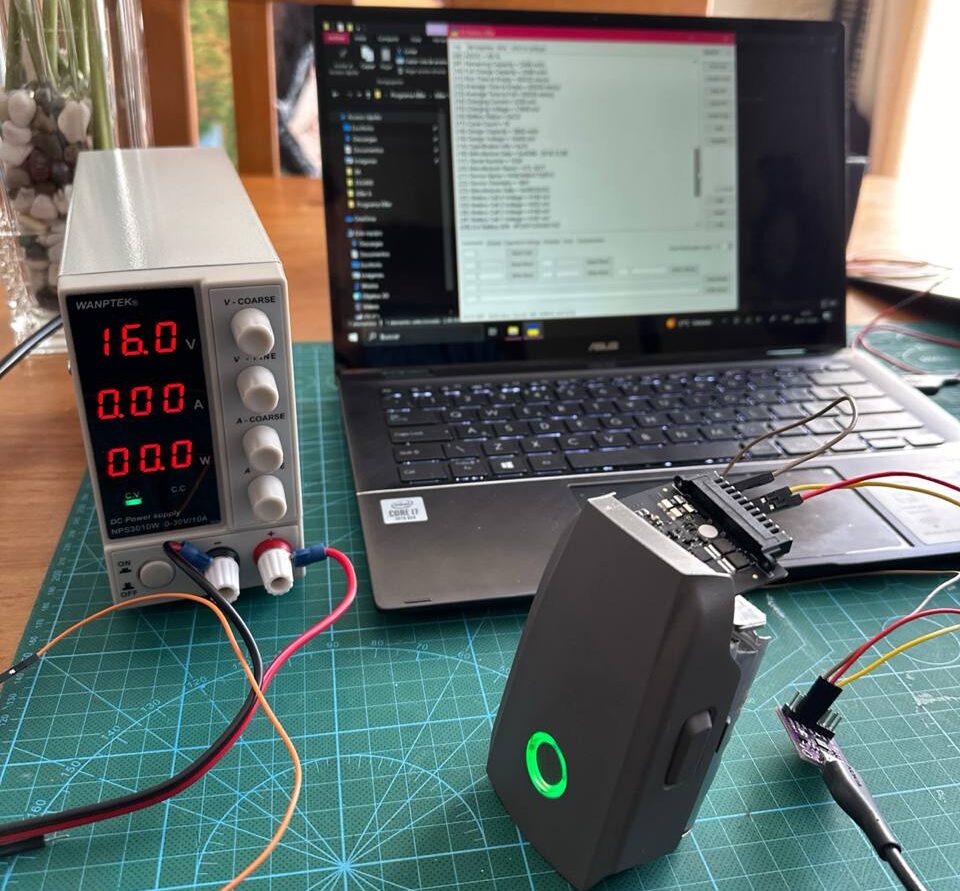
This comprehensive guide shows you how to revive dead DJI drone batteries using the CP2112 adapter and DJI Battery Killer software. This method has proven successful for various DJI drone models, including the Mavic 2, Mavic Air, Mini 2, Mini, and Spark.
When a drone battery experiences a power failure, the Battery Management System (BMS) registers what’s known as a power failure flag or “pflag.” This occurs when the battery voltage drops below a particular threshold, causing the BMS to shut down and render the Battery unusable. This can also happen when replacing cells, as the process requires disconnecting the BMS.
Thanks to Erick Santos for providing the photos and guidance on battery recovery in this tutorial.
Safety Warnings
Before proceeding, please note these necessary safety precautions:
- Never attempt to revive batteries with swollen cells. Replace damaged cells before attempting recovery.
- Work in a well-ventilated area away from flammable materials.
- Wear protective gloves and eye protection when handling lithium batteries.
- Have a proper fire extinguisher rated for lithium battery fires nearby.
- Never leave the process unattended while the power is connected.
- Disconnect immediately if the Battery becomes hot or starts to swell.
Required Materials for Revive Dead DJI Batteries
- CP2112 USB-to-I2C adapter (Amazon.com / Aliexpress)
- Jumper wires (Amazon.com / Aliexpress)
- Adjustable power supply ( up to 16V) (Aliexpress)
- Dead DJI battery
- Micro USB cable (Aliexpress.com)
- Small screwdriver set (only needed for Mavic Pro batteries)
Success Story
My colleague successfully revived all three DJI Spark batteries, which had been stored for over a year and were completely dead. He brought them back to life using just a $10 CP2112 adapter from Amazon and basic soldering skills. For most models, you don’t need to disassemble the batteries (except for Mavic Pro batteries, which require opening).
Battery Specifications and Pinouts
DJI Spark Battery (MB1)
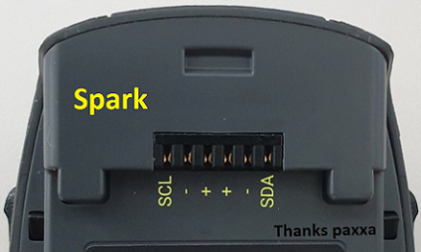
Specifications:
- Nominal Voltage: 11.4V
- Design Capacity: 1480mAh
- Design Energy: 16.87Wh
- Max. Charge Voltage: 13.05V
Cells:
- Type: LiPoHV
- Voltage: 3.80V (4.35V max)
- Capacity: 5.62Wh
- Size: 6.3 x 33 x 60mm
- Manufacturer: ATL
- Configuration: 3S1P
Buy DJI Spark Battery From Aliexpress.com
DJI Mavic Mini Battery (MB2)
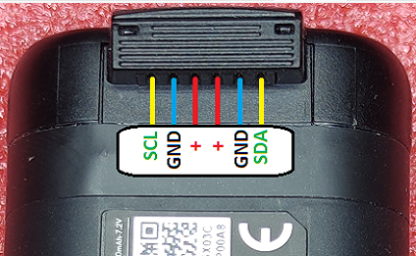
Specifications:
- Nominal Voltage: 7.2V
- Design Capacity: 2400mAh
- Design Energy: 17.28Wh
- Max. Charge Voltage: 8.4V
Cells:
- Type: Li-Ion
- Voltage: 3.70V (4.20V max)
- Capacity: 2500mAh
- Model: Samsung INR18650-25R
- Configuration: 2S1P
Chip:
- bq9003 (Texas Instruments)
- Firmware: bq40z307 (DJI)
Buy DJI Mavic Mini Battery from Aliexpress.com
DJI Mini 2 Battery (BWX161)
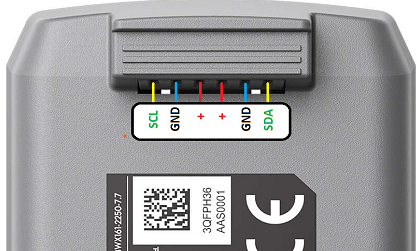
Specifications:
- Nominal Voltage: 7.7V
- Design Capacity: 2250mAh
- Design Energy: 17.32Wh
- Max. Charge Voltage: 8.8V
Cells:
- Type: LiPoHV
- Voltage: 3.85V (4.40V max)
- Capacity: 2250mAh
- Size: 8 x 34 x 62mm
- Configuration: 2S1P
Chip:
- bq9003 (Texas Instruments)
- Firmware: bq40z307 (DJI)
Buy DJI Mini 2 Battery from Aliexpress.com
DJI Mavic Air Battery (PB1)
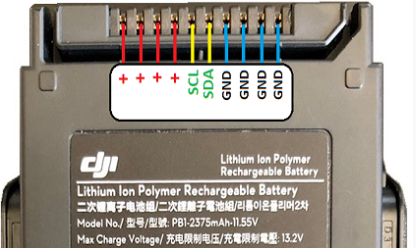
Specifications:
- Nominal Voltage: 11.55V
- Design Capacity: 2375mAh
- Design Energy: 27.43Wh
- Max. Charge Voltage: 13.20V
Cells:
- Type: LiPoHV
- Voltage: 3.85V (4.40V max)
- Capacity: 2375mAh
- Size: 6.9 x 37 x 72mm
- Configuration: 3S1P
Chip:
- bq9003 (Texas Instruments)
- Firmware: bq40z307 (DJI)
Buy DJI Mavic Air Battery From Aliexpress.com
Step-by-Step Revival Process
1. Connect the CP2112 Adapter to the Battery
The CP2112 chip communicates with the Battery’s BMS through the SDA and SCL pins, helping us address issues such as power failure, disconnection, or short circuits.
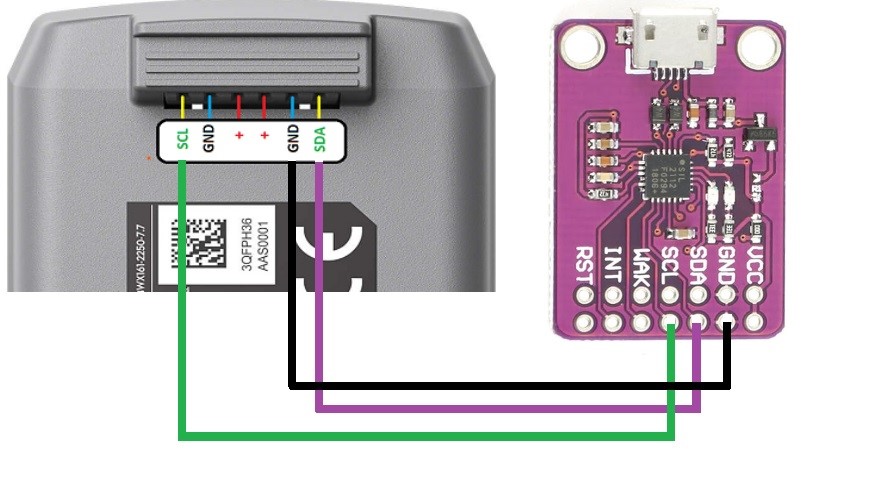
Make the following connections:
- Connect CP2112’s SDA pin to the Battery’s SDA pin
- Connect CP2112’s SCL pin to the Battery’s SCL pin
- Connect CP2112’s GND to the Battery’s GND
- Connect CP2112’s VCC to the positive terminal of the Battery
2. Connect the Power Supply to the Battery
You’ll need to apply external power while using the CP2112 for entirely dead batteries.
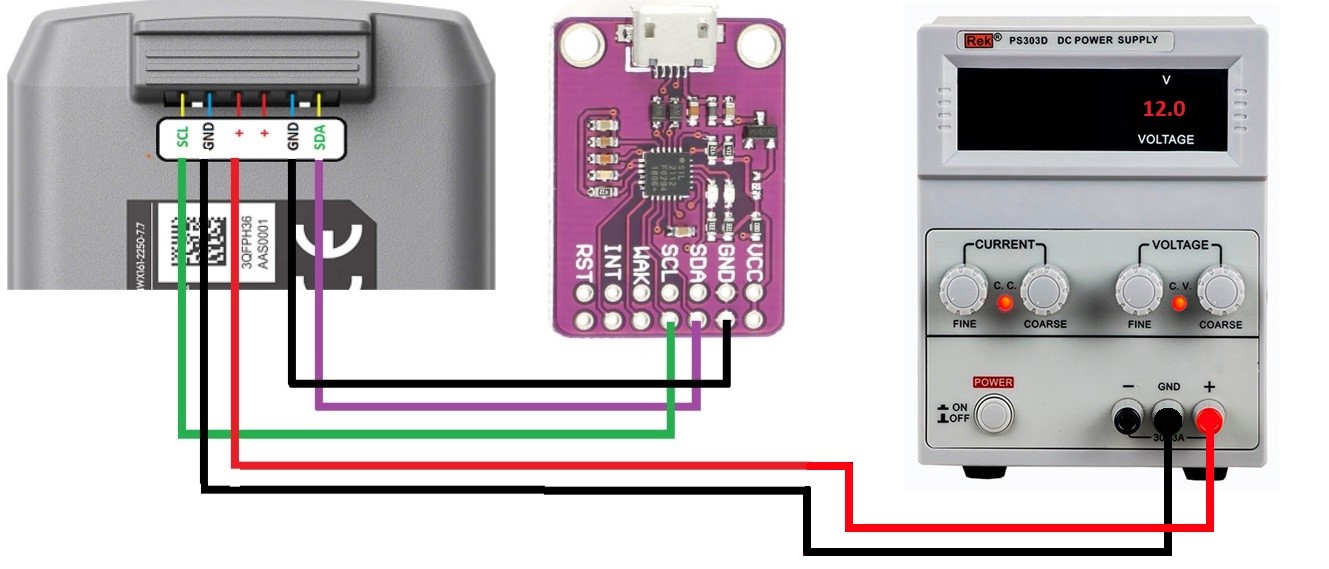
- Set your adjustable power supply to the appropriate voltage for your drone model:
- Mavic 2/Mavic 3: Use 16V
- Air 1/Air 2: Use 12V
- Mini 1/Mini 2: Use 8V
- Spark: Start with 9V, increase to 12V if needed
- Connect the positive lead from your power supply to the Battery’s positive terminal
- Connect the negative lead from your power supply to the Battery’s GND terminal
- Connect the CP2112 to your computer via USB while maintaining these connections
Important Tip: The voltage recommendation is critical. Using a voltage that is too low (like 9V when 12V is needed) can cause the PF Flag Clear operation to fail repeatedly. Using the correct voltage ensures successful revival.
3. Install and Use DJI Battery Killer Software
- Download DJI Battery Killer software and install it on your PC
- Launch the application
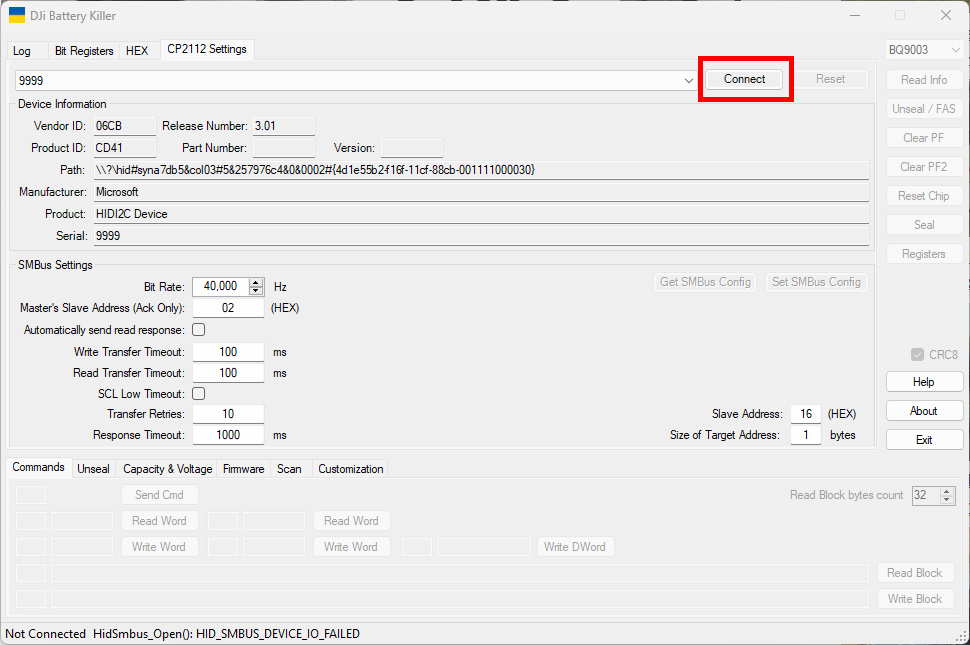
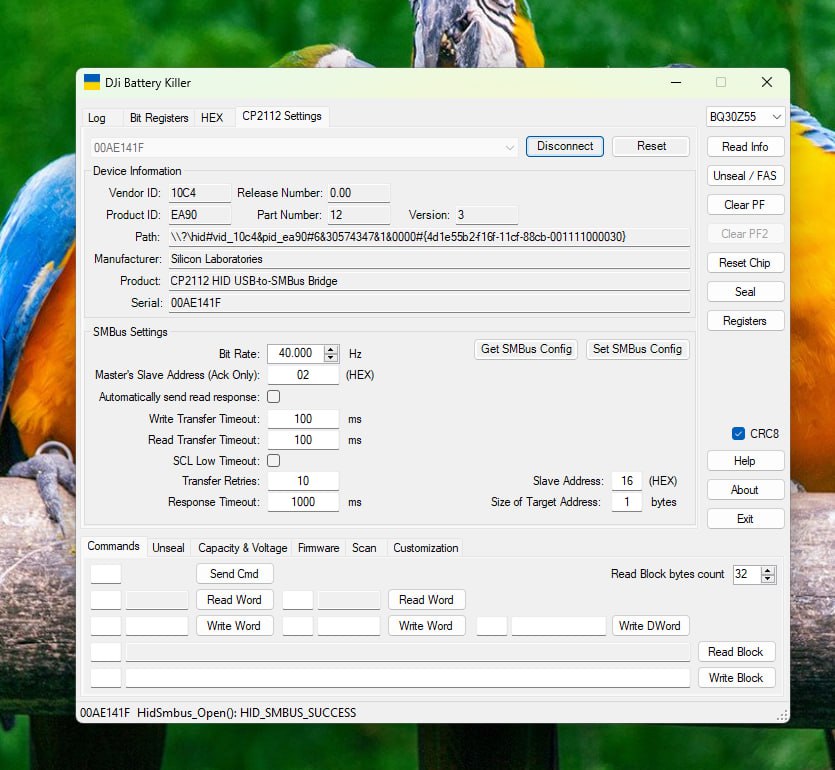
- In the CP2112 Settings section, select BQ30Z55 from the dropdown menu
- Click Connect to establish a connection between the software and the CP2112 adapter
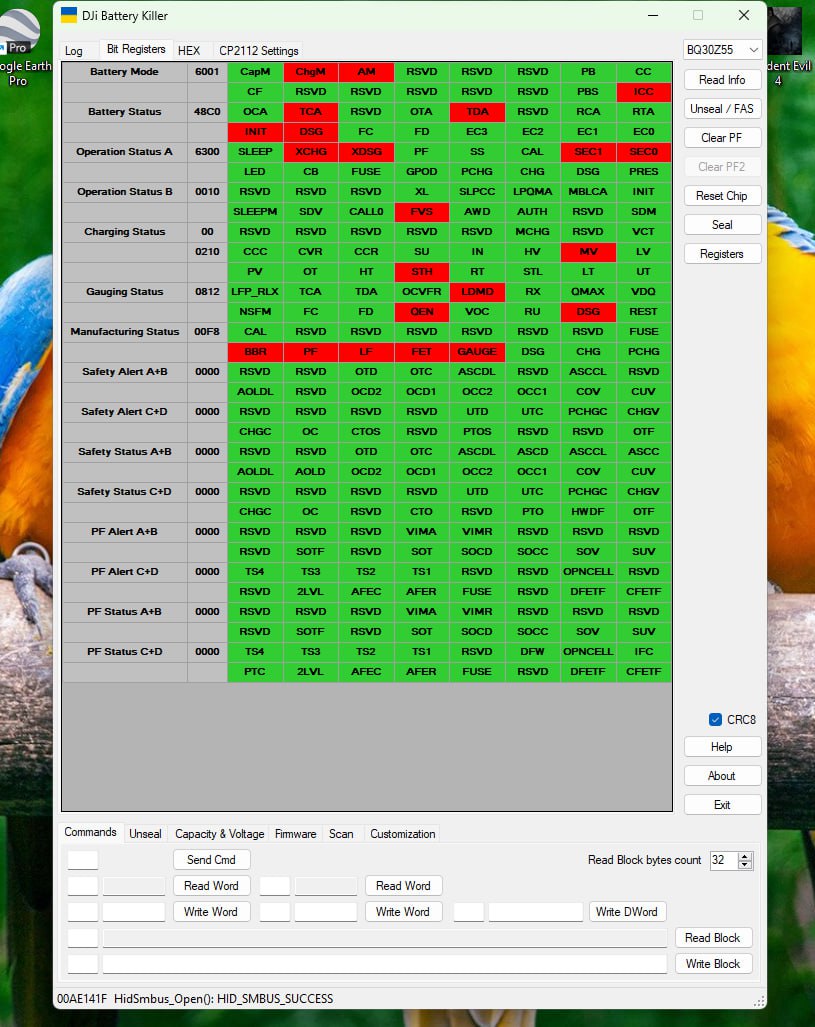
- Click on Bit register – a screen with green and red colors will appear, showing various registers, including PF flags (typically in red)
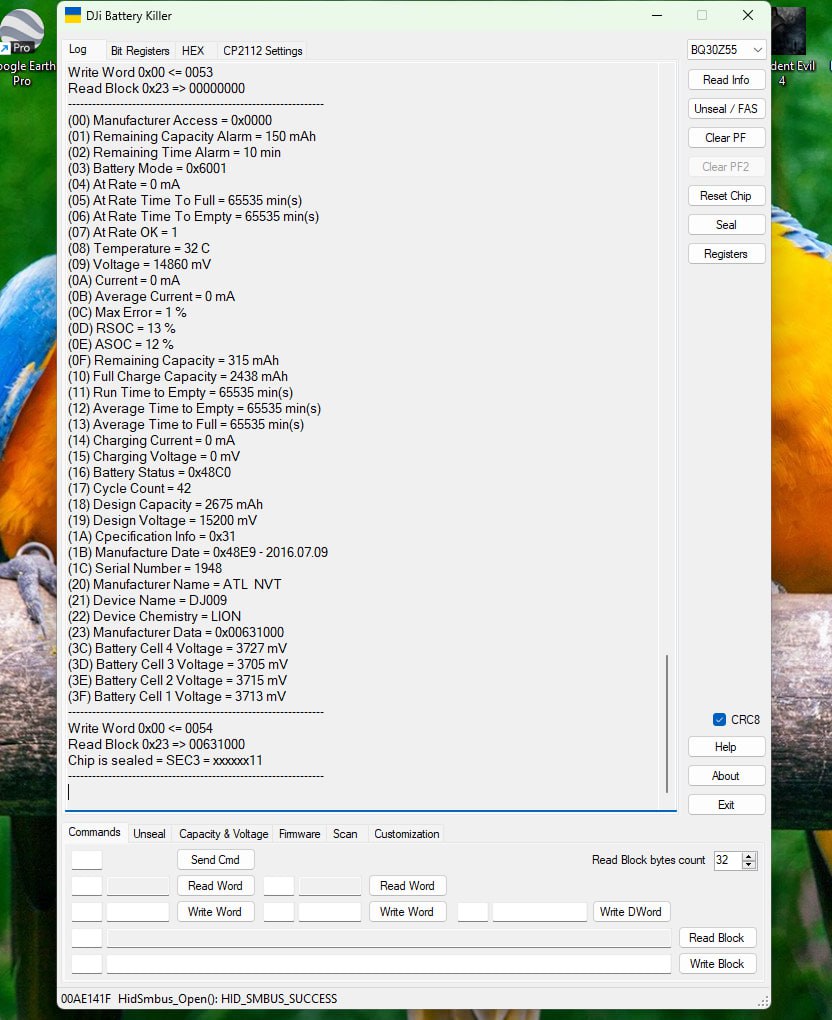
- Click on Read Info to see detailed information about your Battery, including:
- Current cell voltages
- Cycle count
- Temperature
- State of charge
- Various error flags
- Click on Unseal to unlock the Battery’s protection
- After unsealing is successful, click on Clear PF to clear the power failure flags
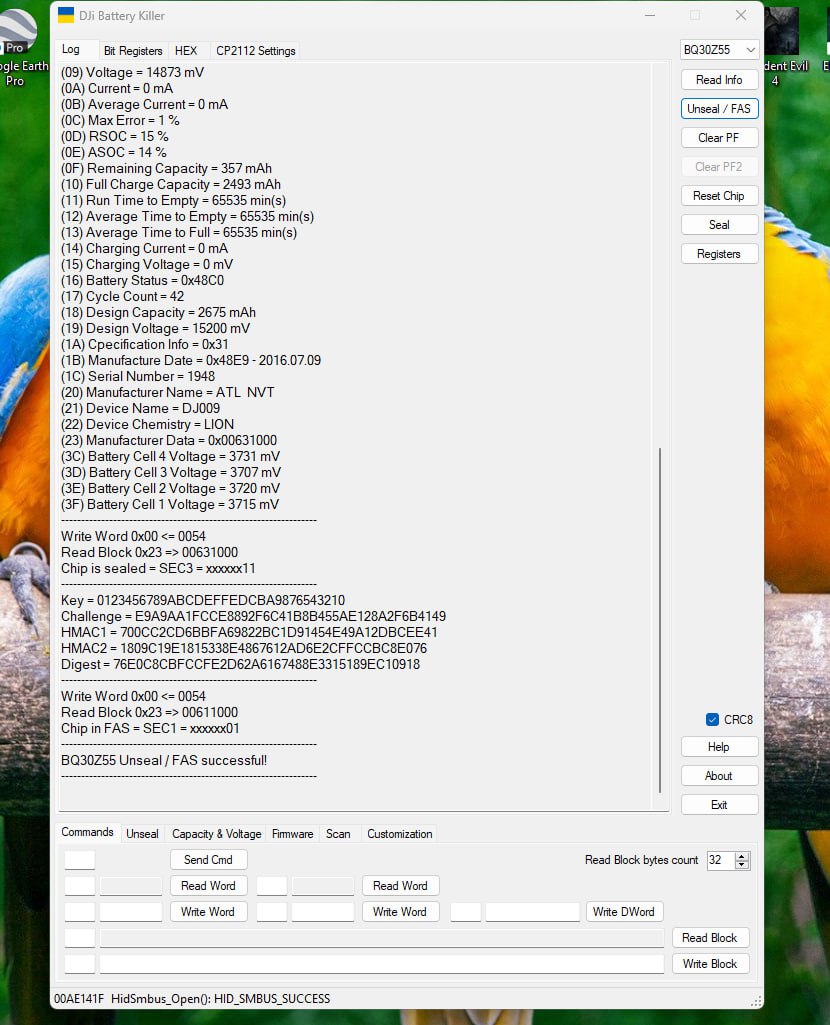
- If successful, you should see the Battery’s LED indicators start to blink
- Click Exit to close the application and disconnect all hardware
4. Test and Charge the Battery
- After successfully clearing the PF flags, disconnect the CP2112 adapter and power supply
- Insert the Battery into its original DJI charger
- The Battery should now charge normally
- Once fully charged, test the Battery in your drone
Troubleshooting
If you encounter issues during the revival process, try these solutions:
- Cannot connect to CP2112
- Check USB connection
- Try different USB ports
- Reinstall CP2112 drivers
- Software fails to read battery information
- Verify all connections, especially SDA and SCL
- Ensure sufficient power is being applied
- Try a different CP2112 adapter (they can sometimes be faulty)
- “Clear PF” operation fails repeatedly
- Increase the voltage of your power supply
- For Spark batteries, try 12V instead of 9V
- Ensure all connections are secure
- The battery shows signs of charging but doesn’t reach full capacity
- Possible cell degradation
- Try multiple charge-discharge cycles
- Consider professional cell replacement
Expected Results
After successfully reviving your batteries, you should experience flight times close to the original specifications. In our tests, all four revived Spark batteries achieved 12-14 minutes of flight time, comparable to brand-new batteries.
How to Fix Dead DJI Drone Batteries Using Battery Killer and CP2112
Conclusion
This method has proven effective for reviving various DJI drone batteries that were rendered unusable due to BMS power failure flags. While the process requires some technical skills and equipment, it’s significantly more cost effective than purchasing new batteries.
Remember to properly store your batteries at approximately 50% charge if you plan to leave them unused for extended periods. This helps prevent the deep discharge that leads to BMS shutdown in the first place.
Happy flying!



11 Comments
I tried but when I run Battery Killer,
I get
FAILED TO CONNECT TO 9999
HID_SMBUS DEVICE NOT SUPPORTED
I got my chip and jumpers following your links to Amazon
Running win 11 fully updated
Please help! THX
In bit regestration pf is in green mode. Please help
What version of DJI Battery Killer are you using? My version was compiled 6/26/21 and it looks completely different – and doesn’t have the “Seal” option.
hello brother you tuto is great, but mi question is, how reset the cycle count? to zero
Hello there,
I’m interesting in the same think as Paco is – howto reset cycle count value – is it possible at all?
Which chips supports your software please?
Does it support BQ8060?
Many thanks
Martin
hi there.
i wonder why battery for navuc 2 pro has to be disassembled.
could you explain?
meny thanks
Thanks for the share.
It works on my Mini 2. But, I use BQ9003 instead of BQ30Z55. The first one was revived very soon. The second one is probably too low voltage. I have to wait until a 9v battery charges it a little bit.
Hi
At “required material” refers to CP2012; it can make searching on Amazon difficult because it is CP2112.
Thanks
Followed this guide with Mavic 2 (Zoom) battery. Still getting error: Could not perform SMBus read 0x00
when jumpers and external power supply are connected at 16V 2A(amps). Also there are multiple GND and multiple + terminals on the Mavic 2 battery. I assume there are corresponding pairs for each of the 4 battery cells and how long do you need to keep the external battery supply connected to the Mavic 2 battery?
I was hoping not to have to cut open the Mavic 2 battery 🙂
Am I missing the part where it lists the RAR extraction password?
I’m trying to recharge my DJI battery after a long period of not charging it. Do you think the “Dji Battery Killer” app works with the BT60 (12s, 46.2V, 5935mhA) Matrice300 RTK?
I opened the battery and saw the SDA, SCL, and +/- indicators.
Sincerely,
Richard